v1.2.0 · macOS 13+ · 30-day free trial
CodeMerge

One menu bar.
A dozen

Screenshots, clipboard history, window layouts, Now Playing, timers, OCR and more — behind a single icon in your Mac's menu bar.

Get CodeMerge — $5 once Free 30-day trial
Apple Silicon & Intel · no account · no subscription · press ⌘ K to search the tools
Finder   File   Edit   View
Fri 18 Sep22:46
Click the menu-bar icon
0tools in one dropdown
0light & dark themes
0clipboard items kept
$0once, forever
Features

Small tools, done properly.

Everything you reach for ten times a day — in your menu bar and your notch. No separate apps, no separate Dock icons.

✦▦♪◷⎘≋⇩⚡
• •
Your calendar's clear
Nothing else in the next 12 hours

The notch, alive

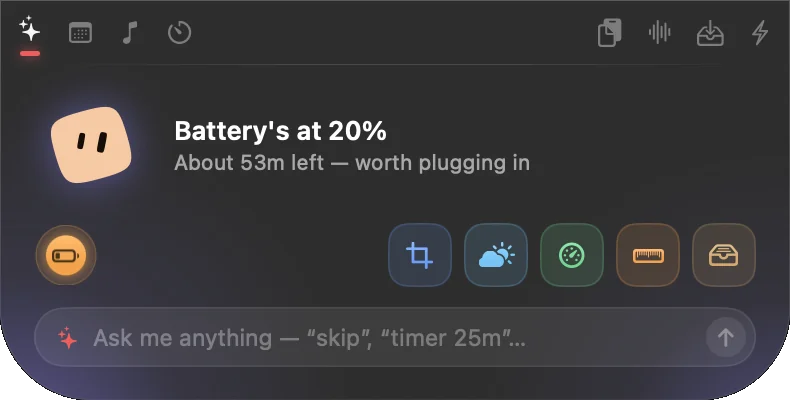
Hover the notch for a live panel: a mascot that reacts, your music with lyrics, timers, calendar, up to 5 widgets and a chat that takes plain commands. Any tool opens right there.

Typing sounds

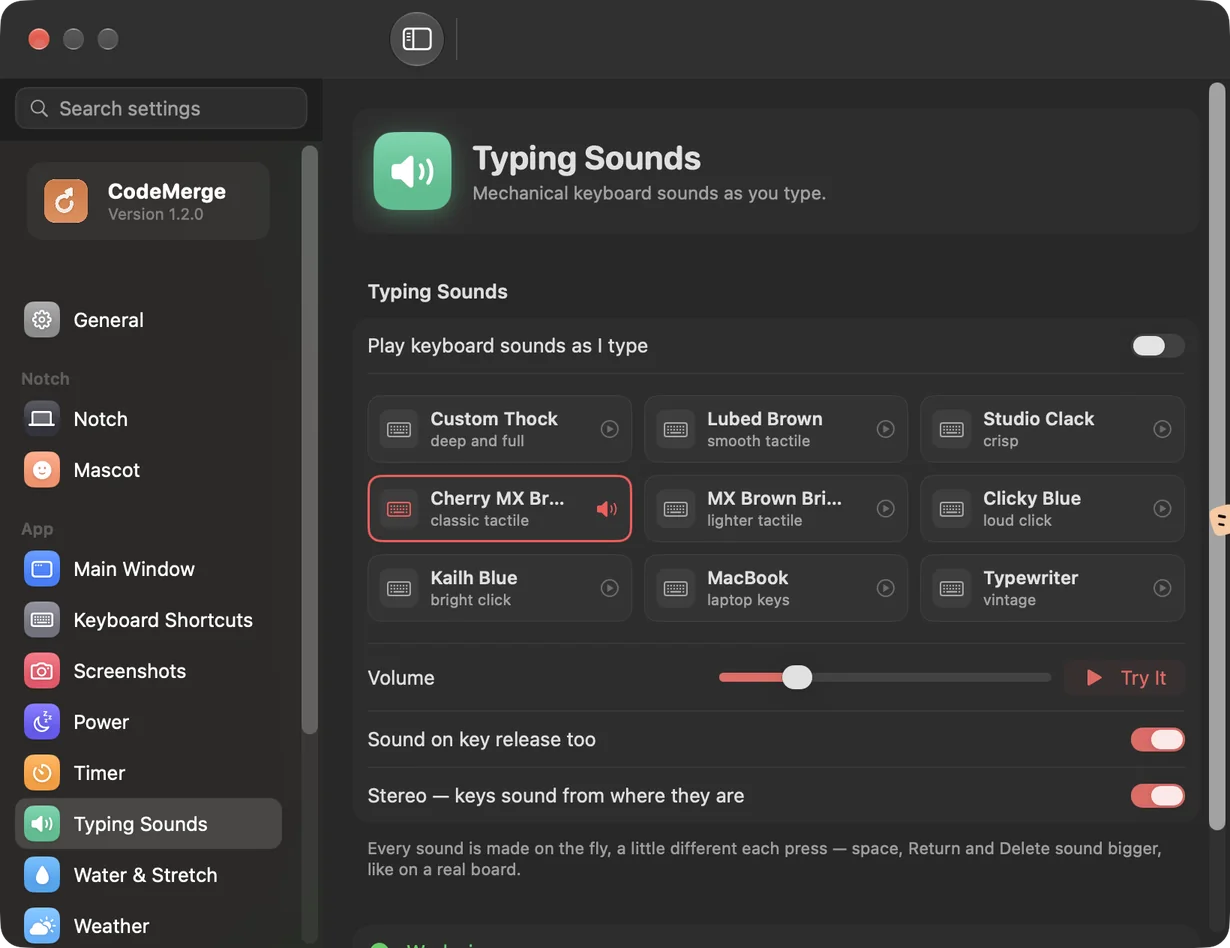
Nine keyboards recorded for real — thocky, tactile, clicky, a MacBook, a typewriter. Stereo, and every key sounds its own.

Presenter tools

Draw on the screen, and show your clicks and shortcuts while you present.

412 Mbps ↓

Speed test

Download, upload and lag, with macOS's own test.

Scrolling screenshots

Click a window — it scrolls and captures all the way down.

lsof -ti :3000
✓ killed process 48213

Kill port

Type a port, end whatever is blocking it.

Order #4821 — total $128.40
Text copied

Text Grab

Drag over any text on screen — it's on your clipboard.

npm run build
#F26B35
meeting-notes.md

Clipboard history

Last 200 copies, searchable, with pinned snippets.

Lovesong
Adele

Now Playing

Music & Spotify: cover art, a live seekable progress bar, volume, playlists and shuffle — without opening the app.

Window layouts

Halves, quarters, or a custom grid you design. Drag windows between cells.

25:00

Timers

Run several; the nearest counts down in the menu bar.

4.2 MB → 0.9 MB
same dimensions

Image Resizer

Drop a picture, pick a strength, get a smaller file.

12 themes

Light, dark and frosted glass. One click to switch.

The real thing

This is what it looks like.

Straight from a Mac running CodeMerge 1.2 — no mockups.

Wi‑Fi100%9:41
The CodeMerge notch panel open on its Home screen: the mascot, a status line, five widgets and a chat field

The notch — hover it and it opens. Widgets, tabs, a chat that takes plain commands.

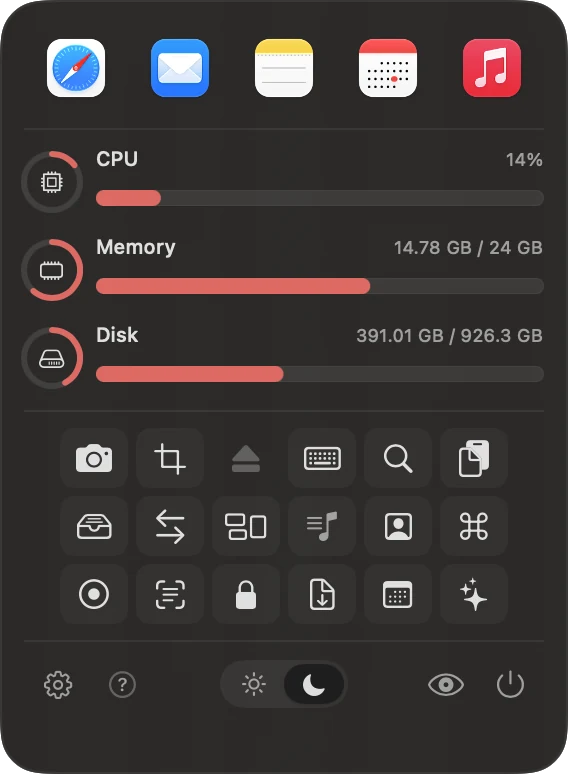
The CodeMerge main window: app shortcuts, CPU, memory and disk, and a grid of tools

The main window — from the menu bar icon.

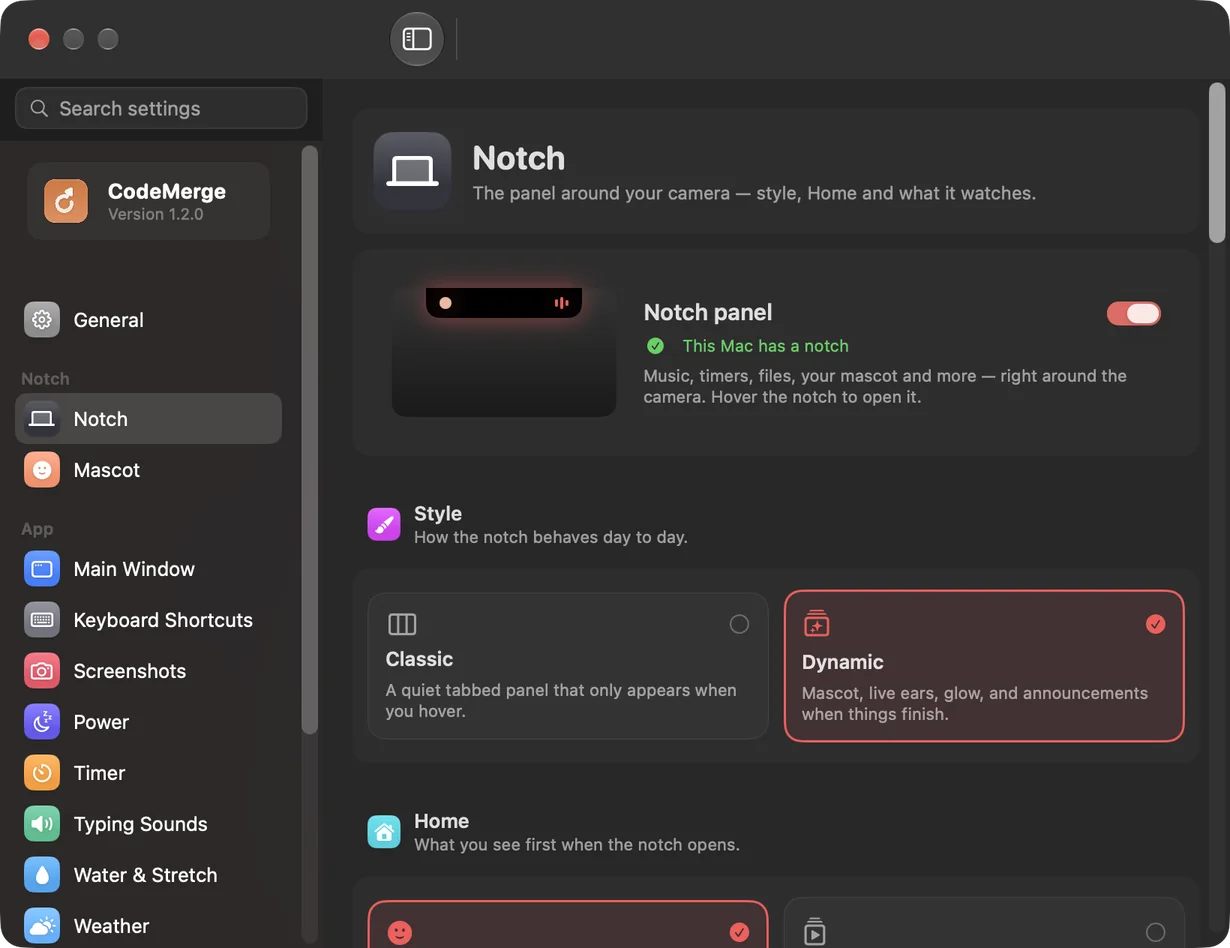
CodeMerge Settings, Notch page
Settings — search finds anything, on any page.
CodeMerge Settings, Typing Sounds page with nine recorded keyboards
Typing sounds — nine keyboards, recorded for real.
How it feels

Scroll — watch your Mac get faster.

Finder   File   Edit   View
Fri 18 Sep22:46
One click away
1

One icon. Everything inside.

Click the menu-bar icon and 23 tools drop down — no Dock icons, no extra windows.

2

Snap your windows.

Halves, quarters or a custom grid. One shortcut cycles the front window through them.

3

Match your Mac.

Pick a Light and a Dark theme, then flip between them with the sun/moon button.

4

Keep focus.

Start a timer and the countdown lives right in the menu bar while you work.

Try it

The real dropdown — play with it.

Click a tool and it opens right in the panel, like the app. Pick your apps, hide tools, set an accent color, change the frost and the wallpaper.

Hover an icon

Appearance

Theme

Wallpaper behind

Pick one Light and one Dark theme in Settings; the sun/moon button next to hide-desktop-icons switches between them.

Mini tools

Working demos. Go on, use them.

These aren't screenshots — they run in your browser, just like the real thing runs on your Mac.

Converter

Length, weight and temperature work fully offline in the app; currency uses live rates, and the Clocks tab tracks up to 5 cities.

→
6.21miles

Random generator

Numbers, dice, coin flips and a Yes / No answer — one click each.

?

Timers

Start a countdown. In the app the nearest timer ticks live in your menu bar.

0:00

Kill process on port

Type a port (3000, 8080, 5173…) and end whatever holds it. In the app it runs lsof + kill for you.

$ waiting for a port…

Window layouts

Cycle the front window through halves, quarters or a custom grid — with one shortcut.

Build your menu bar

What do you do all day?

Tick what sounds like you — we'll suggest the tools and a theme to start with.

I often…

I prefer…

Nothing is sent anywhere — this runs in your browser.

Your starter menu bar

Watch

Ten seconds each.

CodeMerge in a terminal
Made for

Whatever your day looks like.

👩‍💻

Developers

Free a stuck port, keep snippets pinned, tile your editor and terminal.

🎨

Designers

Grab a color from anywhere, shrink images, snap a screenshot in one click.

🎓

Students

Copy text out of slides, run study timers, keep a scratch note handy.

🏠

Remote workers

Music in the menu bar, a clean-keyboard mode for calls, one-click lock.

Replace a folder of apps

One install instead of seven.

You'd normally installJobIn CodeMerge
A window managerHalves, quarters, custom grids✓ Window layouts
A clipboard managerHistory, search, pinned snippets✓ Clipboard history
A screenshot toolFull screen, area, recent captures✓ Screenshots
An OCR appCopy text out of anything on screen✓ Text Grab
A timer appSeveral countdowns, live in the menu bar✓ Timers
A media widgetMusic & Spotify controls✓ Now Playing
A converter, a resizer, a dev-utilityUnits, images, freeing ports✓ Converter · Resizer · Kill port
Price

$5. Once. That's it.

$5 one time
  • All 23 tools, every future update
  • 30-day full free trial
  • No account, no subscription
  • Use it on all your own Macs
Buy CodeMerge

Over 3 years…

CodeMerge — $5
A $2.99/mo utility —
A $9.99/mo utility bundle —
Updates

Already have CodeMerge? See what's new.

Live from the GitHub releases. Check your version, read the notes, or tell me what to build next.

Google Calendar coming in a future update

  • Sign in with Google and see your meetings right in CodeMerge — no API keys, nothing to set up.
  • A countdown to your next meeting and a one-tap Join for Google Meet, Zoom and Teams calls.
  • Read-only: CodeMerge only ever reads your calendar; it never changes it.

v1.2.0 latest

  • New — the notch: on Macs with a notch, a live panel with a mascot, music and lyrics, timers, calendar, 5 widgets and a chat. Any tool opens inside it.
  • New tools: presenter tools, speed test, package tracking, Measure, one-click scrolling screenshots, golden hour, water & stretch reminders, lyrics.
  • Typing sounds recorded from 9 real keyboards; searchable Settings; 6 MB download.

v1.1.3

  • Workflows: combine tools into one command — hide desktop, keep awake, switch audio, start a timer, quit apps, lock — built in Settings and run from the dropdown.
  • Screenshot annotations: arrows, shapes, highlighter, pen, numbered steps, blur and text; select, move and resize anything; copy or save.
  • World clocks: up to 5 cities with free-text search, day/night, and a meeting-planner slider.

v1.1.2

  • Timer: redesigned with a Custom entry, compact cards and quick-add.
  • Converter: redesigned From / To cards.
  • Window layouts: 12 layouts, including mixed-size ones.

v1.1.1

  • Themes: separate Light and Dark groups (6 each), a sun/moon quick switch, frosted glass, the Mirror themes.
  • Now Playing: live progress bar, and Shuffle All / Favorites / Playlists / Genres in the playing menu.
  • Spotify: fixed layout flicker; honest Resume feedback.

Am I up to date?

Find your version in Settings → General (or CodeMerge menu).

Type your version to compare.
brew upgrade --cask codemerge

Or: Settings → General → Check for Updates…

Subscribe via RSS · All releases

💡 Suggest an idea

Missing something? Tell me — ideas shape the next release. This opens your email app.

Get started

Installed in under a minute.

Recommended — skips the "unidentified developer" step.

curl -fsSL https://raw.githubusercontent.com/harelyaish/CodeMerge/main/install.sh | bash

macOS won't open it?

Normal for any indie app outside the App Store. One-time fix:

  1. Right-click (or Control-click) the app → Open, then click Open.
  2. If it only offers "Move to Trash": System Settings → Privacy & Security, scroll to Security, click Open Anyway.
  3. Approve once — every later launch is normal.
FAQ

Questions, answered.

Does it work on Apple Silicon and Intel?

Yes — one universal build covers both, on macOS 13 (Ventura) or later.

Why does macOS say it's from an "unidentified developer"?

CodeMerge isn't distributed through the App Store or Apple's notarization, so a browser download gets flagged like any indie app. The Terminal install command skips that entirely, or right-click the app → Open once.

Is my data sent anywhere?

No. Only Weather and the currency converter make plain HTTPS calls, with no account or key. Clipboard history, screenshots, notes and settings stay on your Mac.

Can I use my license on more than one Mac?

The license is personal and non-transferable, but nothing technical stops you using it on your own Macs — it isn't hardware-locked.

What if I want a refund?

Refunds are handled by Gumroad from your purchase receipt email.

Does it work with Google Calendar?

Not yet — it's coming in a future update: sign in with Google and see your meetings in CodeMerge, with a countdown and a one-tap Join. Until then, calendars added to the Mac's own Calendar app already work.

How do updates work?

Settings → General → Check for Updates. Updates are signed, so a download is verified before it replaces the app.

Help & feedback

Stuck, or got an idea?

The same options as CodeMerge's ? menu. Start with the FAQ — most answers are there.

🎧

Contact support

Something not working, or a question the FAQ doesn't cover? Ask here and you'll get a reply.

Ask a question ↗
💡

Request a feature

Tell me what CodeMerge should do next — ideas from users decide what gets built.

Suggest a feature ↗
🐞

Report a bug

Found something broken? A short form with your macOS and CodeMerge versions helps fix it fast.

Report a bug ↗

All of these open on GitHub — free, and you can follow the reply.

Get your menu bar working
as hard as you do.

30 days free. Then $5, once.

CodeMerge · $5 onceBuy